
Prompt Guide · 2026
How to Write Better Prompts for P Video
Across every P Video tool, the prompt is the single biggest factor in your final result. This guide gives you a framework, templates, and 50 examples to write prompts that work.
Quick Answer
Whether you use the P Video AI Video Generator, P Video Avatar, or P Video Animate, the prompt determines the final output. Many users obsess over reference images, motion videos, and resolution — yet overlook the prompt. In most cases, a well-crafted prompt yields better results than simply swapping source assets.
Why Prompts Matter
The prompt is the instruction set that tells the AI how to interpret your creative intent. It influences visual style, motion expression, facial and body behavior, realism vs stylization, speaking and pacing, and overall mood. A good prompt turns a basic draft into a polished animation or video.
What Is a Prompt in P Video?
A prompt is a text description that guides the AI toward your desired outcome. Unlike a blueprint, it is interpreted by the model — so clarity and structure matter. It tells the AI what to show, how subjects move, the emotional tone, the level of realism, and character behavior.
Bad prompt
“Make it look nice.”
Good prompt
Cinematic product shot with smooth camera movement, dynamic lighting, and clear foreground focus.The difference is clarity and specificity — the more precise the prompt, the better the AI can produce realistic results.
How Prompts Work Across P Video Tools
Prompts interact differently with each product.
P Video AI Video Generator
A prompt describes scene composition, camera angle and motion, background, environment, lighting, object behavior, and narrative actions. The generator blends your prompt with uploaded graphics and text.
Professional presenter demonstrating AI software, modern office environment, medium shot with slow dolly-in, soft studio lighting, realistic motion.P Video Avatar
Prompts influence facial expressions, head motion, gesture style, and speaking demeanor. The avatar system takes your prompt along with a portrait and audio to shape natural movement.
Professional presenter, friendly facial expression, smooth speaking rhythm, stable identity, realistic animation.P Video Animate
Prompts provide motion style direction, expression style, how closely to follow source motion, and identity-preserving instructions. Because motion comes from a video, the prompt acts as a style lens.
Transfer source motion naturally, stable identity, realistic facial expression, smooth gesture transitions.Understanding How AI Interprets Prompts
AI does not execute text literally — it interprets semantic meaning.
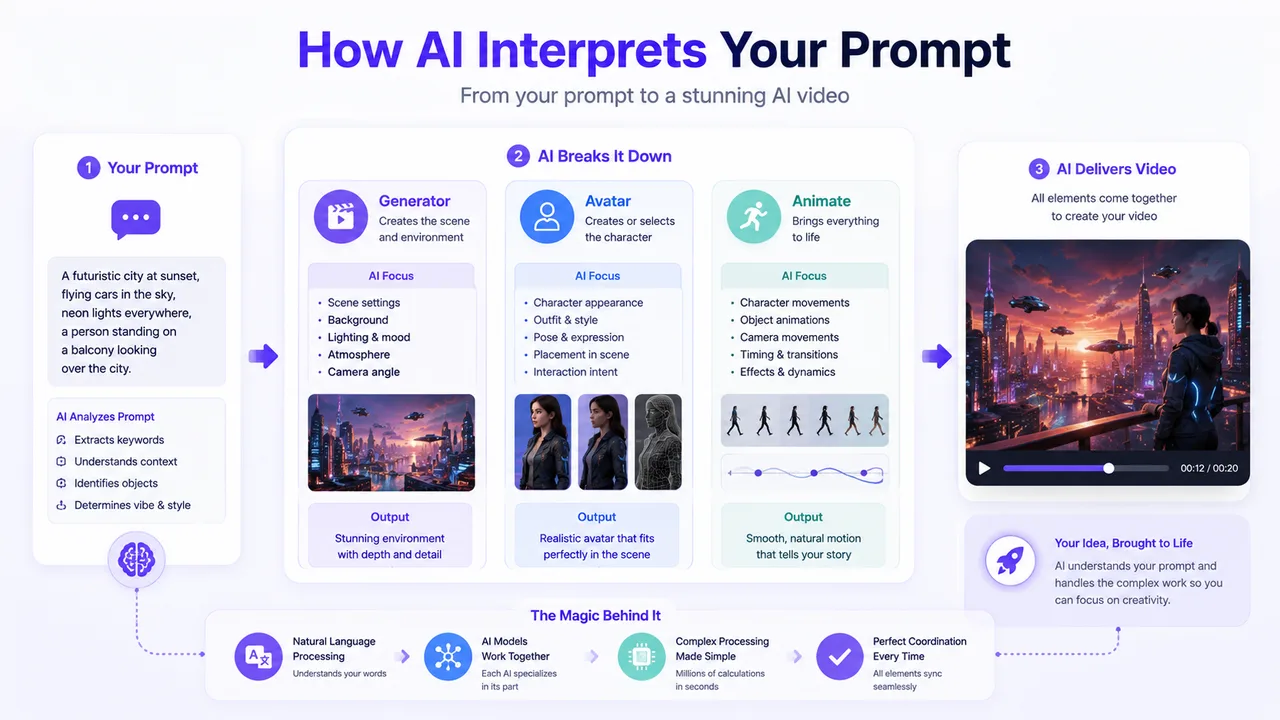
- Subject: who or what is in the scene
- Action: what is being performed
- Scene: where it takes place
- Style: visual or motion style
- Mood: tone and emotional context
So instead of “Make it move,” write “Professional presenter speaking confidently with natural gestures.”
Prompt Mastery Framework
To write better prompts, think in four layers.
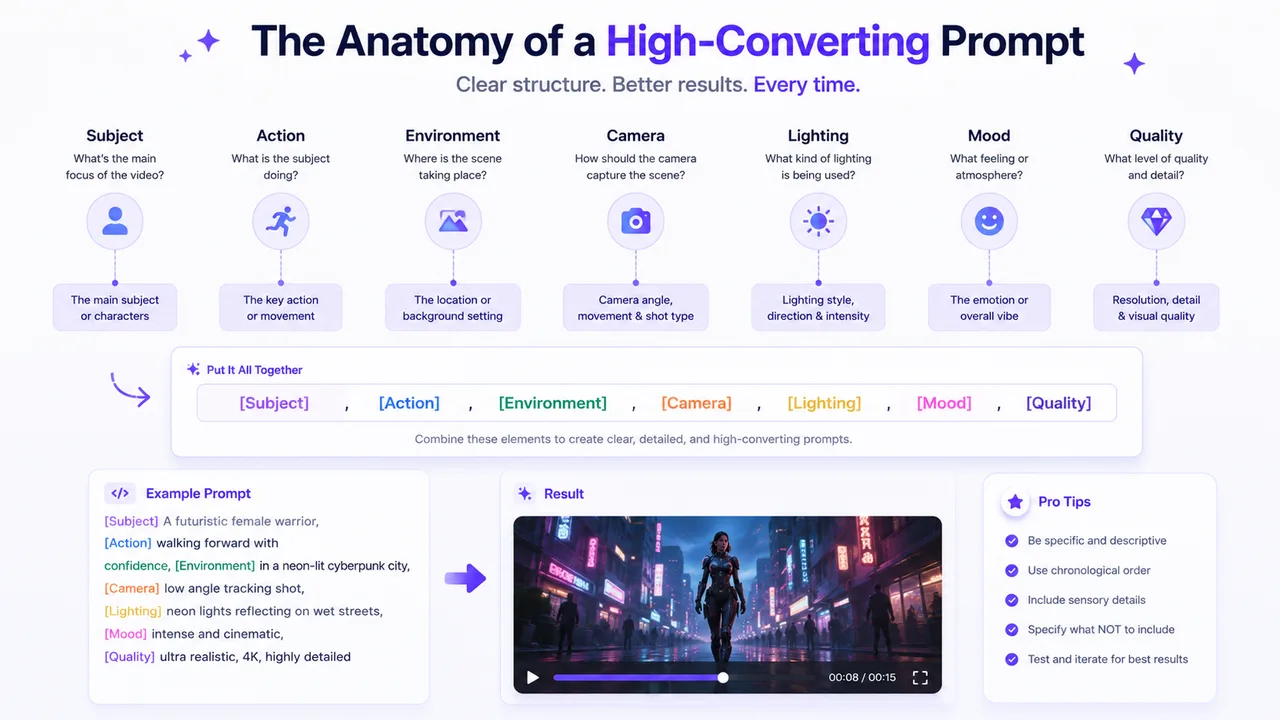
1. Identity / Subject Preservation
Keep the subject visually consistent — stable identity, preserve facial features, maintain proportions, no distortion.
2. Movement Quality / Motion Style
Define how things move — natural, smooth, fluid, energetic, or calm and controlled; expressive but realistic.
3. Facial Expression / Emotion
Guide how the subject expresses — friendly, confident, neutral-calm, professional, engaging delivery.
4. Visual Quality / Realism
Set how polished the result should be — realistic motion, clean detail, cinematic quality, soft lighting.
General Prompt Writing Formula
Identity + Motion Style + Expression + Visual QualityFor example:
Stable identity, natural movement, friendly facial expression, realistic animation quality.This works well for avatars and animated character videos.
Best Practices for Prompt Writing
- Start with a clear intent.
- Use simple, specific language.
- Focus on behavior, not metaphor.
- Avoid conflicting instructions.
- Test and refine iteratively.
- Use prompt templates as starting points.
Prompt Templates by Use Case
Templates for P Video Generator
Use these when creating fully generated videos.
Cinematic Scene (Product Demo)
Foreground object: Professional presenter holding product
Background environment: Minimalist studio
Camera movement: Slow dolly-in with smooth pan
Lighting style: Soft studio light, high contrast
Mood: Clean and professional
Animation style: Realistic motion, high-detail rendering
Educational Animation
Foreground subject: Teacher at digital whiteboard
Background: Classroom with floating icons
Camera movement: Slow pan, zoom on key visuals
Lighting: Neutral and soft
Mood: Approachable, informative
Animation: Realistic gestures, clear motion on teaching actions
Social Media Promo
Foreground: Energetic creator with gesture emphasis
Background: Colorful gradient with motion blur
Camera: Quick zooms and punch-in shots
Mood: Exciting and upbeat
Style: Expressive motion, fast pacing
Templates for P Video Avatar
Avatar prompts focus more on expressions and realism.
Professional Presenter
Stable identity, natural speaking movement, confident facial expression, clean visual detail, realistic motion quality.Friendly Educator
Reliable presence, calm head movement, friendly expression, natural speaking rhythm, subtle gestures.Engaging Social Host
Energetic movement, expressive facial animation, engaging delivery, identity preserved, realistic motion.Templates for P Video Animate
When transferring motion from a source video.
Product Motion Transfer
Apply source motion to subject with stable identity, natural hand movements, realistic motion, smooth transitions.Online Lesson Motion
Friendly teacher expression, refined movement from source, natural eye and head motion, realistic animation.Creative Characters
Expressive body movement, emotional gestures from source, identity preserved, high visual quality.Advanced Prompt Customization Techniques
Dynamic Prompt Adjustment
Modify prompts iteratively based on test outputs instead of expecting a perfect result in one generation — e.g. add “with hand gestures and slow camera zoom” to a working base prompt.
Style Blending
Combine multiple visual or motion styles in a single prompt — realistic + cinematic, or professional + friendly.
Motion & Expression Control
Use precise cues for subtle behavior — slight head tilt, subtle smile, confident gesture — alongside high-quality facial expression.
Platform-Specific Optimization
Tailor to the target platform — exaggerated expressions for short social videos, subtle gestures and professional posture for corporate.
Combining Source Inputs with Prompts
For Avatar or Animate, pair audio and source motion with a detailed prompt — e.g. a CEO walking-and-speaking source plus a quarterly-report prompt.
Iterative Strategy
Change one variable at a time, keep optimized elements, and record outputs. Usually 3–5 iterations reach the best result.
50 Best P Video Prompt Examples
Adapt these for your own projects across marketing, education, social media, business, and character work.
Marketing
- Professional presenter introducing a new AI software platform
- Product demonstration with smooth gestures
- Brand ambassador explaining product benefits
- Marketing spokesperson with confident delivery
- SaaS feature launch announcement
- Modern startup founder presentation
- Premium product advertisement
- Technology product showcase
- Software onboarding introduction
- Customer success story presentation
Education
- Friendly teacher explaining a science lesson
- Online instructor presenting a tutorial
- Educational presenter with natural gestures
- History teacher storytelling style
- Mathematics instructor explaining formulas
- Corporate trainer delivering onboarding content
- Language learning instructor
- Digital classroom presentation
- Academic lecture style
- Workshop facilitator
Social Media
- Influencer sharing productivity tips
- TikTok creator discussing trends
- Lifestyle creator speaking naturally
- YouTube Shorts presenter
- Instagram Reel host
- Travel content creator
- Fitness coach presentation
- Entrepreneur sharing advice
- Tech reviewer introduction
- Creator promoting a new project
Business
- CEO presenting quarterly results
- Executive sharing company updates
- Corporate communications video
- Investor relations presentation
- Professional conference speaker
- Leadership training presenter
- HR onboarding spokesperson
- Business consultant introduction
- Sales training instructor
- Internal company announcement
Character Animation
- Fantasy character telling a story
- Animated mascot introducing a product
- Cartoon teacher explaining a lesson
- Sci-fi character delivering a message
- Game NPC speaking naturally
- Storybook narrator character
- Virtual influencer presentation
- Friendly AI assistant
- Brand mascot onboarding users
- Animated storyteller around a campfire
Common Prompt Mistakes
Too short and vague
Instead of “Make it look interesting,” write “Cinematic angles, natural motion, realistic lighting, expressive.”
Too many conflicting instructions
“Energetic and calm, slow but fast, close-up and wide shot” confuses the model.
Ignoring frame & environment
Irrelevant background details can lower generation quality.
Optimize Your Prompt Workflow
- Draft Prompt — Start with a structured template.
- Generate Draft — Produce a test draft.
- Review Output — Check motion, expression, and quality.
- Refine Prompt — Adjust wording one variable at a time.
- Regenerate — Repeat until satisfied.
Prompt Testing Tips
- Write and store multiple prompt variants.
- Compare outputs side by side.
- Keep one variable different at a time.
- Track which phrases work best.
Prompt Keyword Library
Use these keywords to improve clarity.
Frequently Asked Questions
What format should prompts use?+
Keep prompts in plain descriptive sentences.
Are longer prompts better?+
Not always — concise and clear often works best.
How many prompts should I test?+
Start with 3–5 variants per project.
Do prompts work the same for every tool?+
No — adjust based on whether you're using Generator, Avatar, or Animate.
Can prompts improve lip-sync quality?+
Yes — specifying facial movement and speaking style helps the AI synchronize better.
Should prompts vary by platform?+
Yes. Short-form social needs more expressive motion; corporate needs subtle gestures.
Can multiple subjects be included in one prompt?+
It's possible but may reduce identity consistency. Single-subject prompts generally work better.
Do background details affect prompt effectiveness?+
Yes — irrelevant or conflicting background descriptors can confuse the AI and lower quality.
Conclusion
Prompts are the most critical factor in P Video AI video creation — they drive realistic motion, identity preservation, expression, visual quality, and a faster workflow. Keep this universal starting template handy:
Stable identity,
natural movement,
friendly facial expression,
clean visual detail,
realistic animation quality.
Ready to create
Put a prompt to work
Take any template above and generate your first clip in the P Video AI Video Generator.